


Roomgpt by Crewlab
4.211.00 Reviews
App Specs
- Version
- 2.21.2
- Updated On
- License
- Free
- Downloads
- 50,000+
- Developer
- Crewlab LLC
- Categories
- House & Home
- Platform
- Android
Screenshots
 Analysis by AppCompare
When a room is shared, redecorating is rarely just a matter of picking a style: one person wants a calmer bedroom, another wants to keep the familiar furniture, and everyone still needs to use the space. I find an AI room-design app most useful at that early, low-stakes stage, when people need something concrete to react to before anyone starts moving things or spending money. Roomgpt by Crewlab is aimed at that kind of home-design exploration, though I’d treat its results as conversation starters rather than a household plan everyone has already agreed to.
Try ideas together before changing the room
A practical shared-device scenario is a couple or housemates looking at the same living room and struggling to picture how a different look might feel. Instead of debating abstract descriptions such as “warmer” or “less cluttered,” you can use a room image as a visual prompt and compare possibilities together. That can make the conversation easier, especially when one person thinks in colors and furniture while another needs to see an example.
I’d keep this workflow focused: agree on which room you’re exploring, make a short list of what must stay, and discuss the broad look you want before generating ideas. That gives everyone a useful reference point and makes it less likely that an appealing image distracts from practical needs such as keeping a clear path or retaining a useful desk. The app can help people talk about a room; it cannot settle household priorities for them.
Keep expectations and account boundaries clear
On a shared phone or tablet, it helps to decide who is taking the room photos and where the resulting designs will be shown or saved. I would avoid treating a shared device as a shared design account by default: people may have different rooms, preferences, or willingness to make purchases. A quick agreement about who is using the app and which space is being discussed can prevent a casual design session from turning into confusion later.
It is also worth separating inspiration from decisions. A generated makeover is not a measurement plan, a renovation quote, or proof that a particular piece of furniture will fit. Before buying anything or changing a wall, check real dimensions and materials independently. That small pause is particularly useful when several people are excited by a visual result and are tempted to move straight from “that looks good” to “let’s order it.”
Use the images to coordinate, not to promise a finished result
If not everyone is home at the same time, a design image can make it easier to share an idea in a household chat or show it later on the same device. I’d pair it with a short note explaining what you like about it: perhaps the lighter palette, a more open feel, or a different arrangement. That gives other people something specific to respond to instead of asking them to approve an entire makeover at once.
There is a trade-off here. A visual suggestion may look cohesive without accounting for every everyday constraint, and different household members may read the same image differently. One person might notice the color scheme; another may wonder whether their belongings or routines still fit. Use the result to identify options and disagreements early, then make the actual plan together.
Worth Reading Before You Choose

EA SPORTS FC Mobile 26 Is a Bigger Football Game, but It Takes Time

Flipboard Shows What News Apps Must Do Beyond the Feed

Switching to Android Auto Means Rethinking Your Driving Routine

Google Calendar Makes a Crowded Week Easier to Manage

Ludo King Makes the Most of the Minutes Between Plans

Baby Panda World Brings Quick Play to Modern Phones, but Its Game Library Feels Busy
Age, trust, and a sensible role for younger users
The app is rated Everyone, which makes its general audience broad, but that does not mean a child should be expected to make household spending or renovation decisions. For a family activity, I’d let a younger person choose a style or explain what they would change, while an adult handles any decisions about purchases, account use, and alterations. That keeps the creative part enjoyable without confusing a visual experiment with permission to change a shared room.
Room design can also involve photos of private parts of a home. I’d make the choice of image deliberately: frame the room itself, leave out personal documents and anything the household would rather not share, and use a parent or guardian’s judgement when a child is involved. Those are sensible habits for any app used with home images, not a claim about how this particular app handles them.
Roomgpt is a free House & Home app from Crewlab LLC, with optional in-app purchases priced from $9.99 to $114.99 per item. It has a 4.2 average from around 3.3 thousand ratings and over 50 thousand installs. The app was released on April 21, 2025, and version 2.0.4 requires Android 7.0 or later. Those details make it easy to identify, but they don’t tell you whether a particular design suggestion will suit your home; that still depends on how carefully you assess the result.
First Impressions and Interface
From the moment I opened Roomgpt, I was greeted with a clean and intuitive interface. The minimalistic design ensures that even the least tech-savvy among us can navigate effortlessly. The app’s layout is straightforward, with all the features neatly categorized, making it a breeze to access everything you need.
One of the first things I noticed was how quickly the app loaded. No one likes waiting around, especially when you're excited to dive into a new tool. Kudos to the developers for ensuring a smooth start-up process!
Features That Stand Out
Roomgpt offers a range of features that are both fun and functional. Here's a deeper dive into what you can expect:
- Room Scanning: Simply take a picture of your room, and the app analyzes the space in seconds. It's almost like magic watching it identify the room's layout and dimensions.
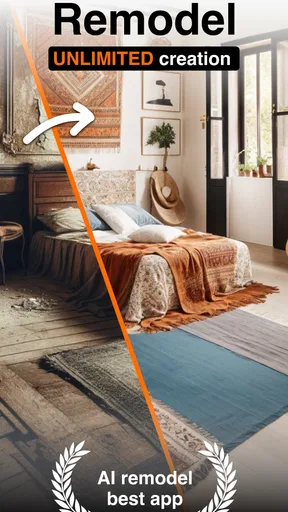
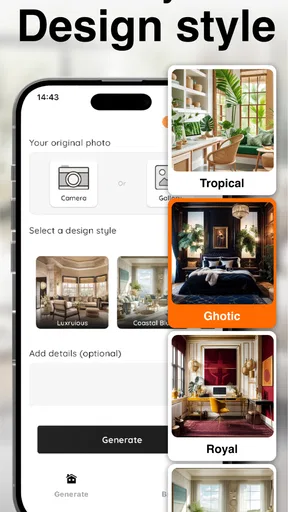
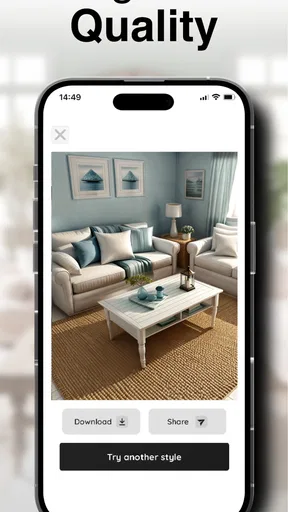
- Design Suggestions: This is where the app truly shines. Based on the scan, Roomgpt offers design suggestions tailored to your space. You can choose from various styles, be it modern, rustic, or minimalistic.
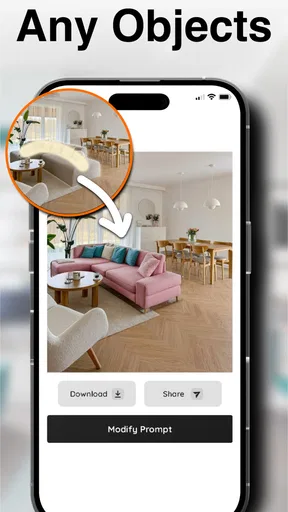
- Customization Options: Not only does it suggest designs, but it also allows you to tweak them. Want to change the color of a wall or swap out a piece of furniture? Just a few taps, and it’s done.
- Augmented Reality (AR) View: This feature lets you visualize the changes in real-time. Walk around your room and see how the new design fits in. It's a game-changer for those who struggle to imagine transformations.
The app also includes a shopping feature where you can purchase suggested items directly. The integration is seamless, and it saves the hassle of hunting down each piece individually.
Performance and Usability
In terms of performance, Roomgpt runs smoothly. During my usage, I didn't experience any lags or crashes. The app is responsive, and actions are executed swiftly, which is crucial when you're trying to visualize multiple designs quickly.
Usability is another area where Roomgpt excels. The app provides a helpful guide for first-time users, ensuring everyone can make the most of its features. The instructions are clear and concise, which is perfect for those who might not be familiar with tech-driven design tools.
Who Will Love Roomgpt?
If you're someone who loves interior design or simply wants to freshen up your space without the traditional hassle, Roomgpt is for you. It's also perfect for those who rent and want to visualize changes without committing to actual renovations.
Moreover, if you're a real estate agent or a home stager, this app could become your best friend. It allows you to present potential buyers with different design options, potentially sealing the deal faster.
Choosing the right tool for the next step
Where Roomgpt fits best is the first round of visual exploration. Compared with browsing furniture catalogs or collecting reference pictures, its room-focused suggestions can give you a more direct way to imagine a change in your own space. Compared with a dedicated floor-plan or room-measuring tool, though, a design image is not the same as a precise layout. If your main question is whether a sofa will fit through a doorway, use a tape measure and a planning tool built for dimensions rather than relying on an attractive rendering.
I’d also use it differently from a professional interior-design service. An app can help you explore styles and get a shared conversation moving, while a designer can account for detailed measurements, materials, budget priorities, and construction constraints. If you are choosing paint, replacing major furniture, or planning work that is hard to reverse, treat the image as inspiration and verify the practical details before committing.
A useful tip is to change one question at a time. First decide whether the household wants a lighter, more relaxed look; then compare what the app suggests. After that, discuss furniture or color separately. When several preferences are changed at once, it becomes harder to tell which part of the design people actually like. This simple workflow makes the app more useful for decision-making, even if the final result is only a small adjustment.
A realistic room-by-room workflow
Imagine that a shared living room feels crowded, but nobody agrees on what to remove. I’d start by choosing a clear view of the room, then ask each person to name one thing they want to preserve and one thing they would like to improve. Use the generated design to compare the overall direction, not to assume that every object shown is available or sized correctly. Once the group agrees on a promising idea, check the actual room and measurements before shopping or rearranging heavy furniture.
For a renter, the same process can help separate reversible ideas from changes that need approval. Try visual options for color and arrangement, then make a practical list of what can be changed without altering the property. For a home stager, the value is in giving a client a quick way to discuss mood and presentation; it should not replace a careful inspection or a realistic staging plan. In both cases, a clear boundary between visual experimentation and action prevents an AI image from being mistaken for a guarantee.
Where the convenience has limits
The main limitation I would keep in mind is that an appealing image can create more confidence than it deserves. A room photo is only a view of a space, and a suggested look may not preserve every detail that matters to the people who use it. If the result makes a room appear larger, more orderly, or easier to furnish, verify those impressions in person. The app is most helpful when you already know what you want to evaluate, not when you expect it to make every household decision for you.
Cost is another reason to take a measured approach. The app is free to download, but optional purchases are available, so I would explore the basic experience before paying for anything. Think about what a purchase would add to your specific workflow and whether you need that extra help more than once. For a one-off room refresh, free visual inspiration or a manual mood board may be enough; for repeated design experiments, paying might feel more worthwhile if the available purchase matches your needs.
There is also a distinction between a visual shopping suggestion and a complete purchasing decision. I would compare any recommended item with alternatives, check its real-world dimensions, and consider whether it works with the household’s budget and existing furniture. The convenience of finding an item from a design screen can save browsing time, but it should not replace ordinary checks on fit and suitability.
Who should use it, and who may prefer another route
I’d recommend Roomgpt to people who want a fast, visual way to explore room styles, especially renters, first-time decorators, and households that need a common starting point for discussion. It can also be helpful to someone who knows a room feels wrong but cannot yet explain whether the issue is color, furniture, or overall mood. Seeing an alternative can turn a vague reaction into a more useful conversation.
I would skip it, or use it only as a secondary tool, if you need exact floor plans, detailed construction guidance, or reliable confirmation that a particular object will fit. It is not a substitute for a measured drawing, a builder’s advice, or a designer’s detailed plan. And if you already have a firm design direction and simply need accurate product specifications, a retailer’s catalog or a dedicated planning tool may take you more directly to the answer.
One question people often have is whether they need design experience to get something useful from it. I don’t think so: a clear photo and a simple goal, such as making a room feel brighter or less busy, are a more helpful starting point than knowing technical design terms. The other natural question is whether a suggested look should be followed exactly. My answer is no—keep the parts that suit your actual room and household, and treat the rest as a prompt to consider alternatives.
For shared use, the useful question is not just “Do we like this?” but “What would we need to check before doing it?” That might mean measuring a wall, asking a landlord, or agreeing which existing furniture stays. For younger users, an adult should guide decisions that involve purchases or changes to shared space. These small checks make a visual design session more grounded and reduce the risk of mistaking a fun idea for a ready-to-follow plan.
Final Thoughts
In a world where technology continues to revolutionize everyday tasks, Roomgpt by Crewlab stands out as an innovative solution for home design enthusiasts. With its powerful features, user-friendly interface, and seamless performance, it’s a tool that transforms the way we approach interior design.
Whether you're redesigning a single room or your entire home, Roomgpt makes the process enjoyable and straightforward. So, if you're ready to see your space in a new light, give Roomgpt a try. You might just find it becomes an indispensable part of your design toolkit.
A grounded household verdict
My recommendation is to use Roomgpt as a low-pressure way to make design ideas visible, especially when several people share a room and need a starting point for discussion. It is less suitable as the final authority on measurements, purchases, or renovations, and anyone making a significant change should check the details outside the app. If you approach it as a creative aid rather than a finished plan, its strongest value is helping a household move from “I’m not sure” to a clearer set of options everyone can evaluate.
Pros
- Easy-to-use interface for quick navigation.
- Generates room designs swiftly and efficiently.
- Wide range of design templates available.
- Integrates seamlessly with smart home devices.
- Supports multiple languages for global users.
Cons
- Limited free features available without subscription.
- Occasional glitches with 3D rendering.
- Requires a stable internet connection.
- Some templates lack customization options.
- May consume significant device storage space.
FAQs for Roomgpt by Crewlab
What is RoomGPT and how does it work?
RoomGPT by Crewlab is an AI-powered design tool that helps users visualize room transformations. Simply upload a photo of your space, and the app uses advanced algorithms to generate design suggestions, offering inspiration for redecorating or remodeling. It's a convenient way to explore different styles without committing to costly changes.
Is RoomGPT available on both Android and iOS?
Yes, RoomGPT is available for download on both Android and iOS platforms. Users can find it on the Google Play Store for Android devices and the Apple App Store for iOS devices, ensuring accessibility across a wide range of smartphones and tablets.
Does RoomGPT require an internet connection to function?
Yes, RoomGPT requires an internet connection to process the images and provide design suggestions. The app relies on cloud-based AI technology to analyze photos and generate results, so a stable internet connection is necessary for optimal performance.
Are there any subscription fees or in-app purchases?
RoomGPT offers a free version with basic features. However, users can opt for a premium subscription to unlock additional design templates, styles, and features. The premium version enhances the user experience by providing more detailed and personalized design options.
How accurate are the design suggestions provided by RoomGPT?
The design suggestions from RoomGPT are generated using sophisticated AI algorithms, offering innovative and feasible ideas. While the app provides creative inspiration, users should consider practical elements such as budget and personal taste when implementing the suggestions. It's a tool for inspiration rather than a definitive design plan.


